반응형


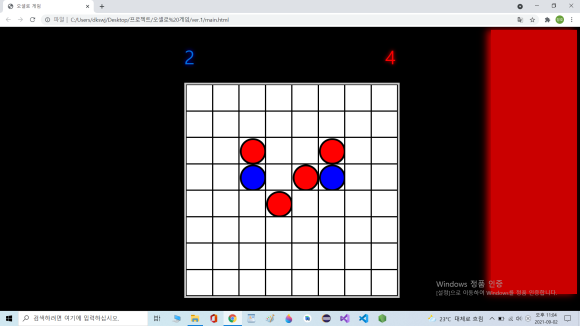
main.html
<!DOCTYPE html>
<html lang="ko">
<head>
    <meta charset="UTF-8">
    <title>오셀로 게임</title>
    <link href="style.css" rel="stylesheet">
    <script src="ReturnMap.js"></script>
    <script src="MakeCells.js"></script>
    <script src="CellClickEvents.js"></script>
    <script src="Main.js"></script>
</head>
<body>
    <div id="leftBackground"></div>
    <div id="rightBackground"></div>
    <div id="content">
        <div id="scoreBoard">
            <div id="blueScore">0</div>
            <div id="redScore">0</div>
        </div>
        <div id="gameBoard"></div>
    </div>
</body>
</html>
Main.js
//전역변수 gameInfo, cells
var gameInfo = {};
var cells;
var redScore;
var blueScore;
var redBar;
var blueBar;

window.onload = function () {
    var map = returnMap();
    cells = makeCells();
    gameInfo.turn = "red";

    redScore = document.getElementById("redScore");
    blueScore = document.getElementById("blueScore");
    redBar = document.getElementById("rightBackground");
    blueBar = document.getElementById("leftBackground");

    blueBar.style.display = "none";

    for (var i = 0; i < 8; i++) {
        for (var j = 0; j < 8; j++) {
            cells[i][j].y = i;
            cells[i][j].x = j;
            cells[i][j].map = map[i][j];
            cells[i][j].piece = "none";
            cells[i][j].addEventListener("click", putPiece, false);
            cells[i][j].addEventListener("click", changeTurn,false);
        }
    }

}
MakeCells.js
function makeCells() {
    var tempCells = [];
    var board = document.getElementById("gameBoard");


    for (var i = 0; i < 8; i++) {
        tempCells[i] = [];
        for (var j = 0; j < 8; j++) {
            tempCells[i][j] = document.createElement("div");
            var thisCell = tempCells[i][j];
            thisCell.className = "cell";
            board.appendChild(thisCell);
        }
    }
    return tempCells;
}
ReturnMap.js
function returnMap(){
    var map = [];
    for(var i=0;i<8;i++){
        map[i] = [];
        for(var j=0;j<8;j++){
            map[i][j] = "none";
        }
    }
    return map;
}
CellClickEvents.js
//클릭하면
// 1. 돌을 놓는다.
// 2. 턴을 바꾼다.
// 3. 주변 돌을 바꾼다.
// 4. 점수를 갱신한다.
// 5. 게임이 끝났는지 검사한다.

// 1. 돌을 놓는 이벤트
function putPiece(e){
    console.log("clicked....!");
    this.removeEventListener("click",putPiece,false);
    this.map = gameInfo.turn;
    this.piece = document.createElement("div");
    this.piece.className = gameInfo.turn + "Piece";
    this.appendChild(this.piece);

    setPieces(this);
    renewScore();
}


// 2.턴을 바꾸는 이벤트
function changeTurn(){
    if(gameInfo.turn=="red"){
        gameInfo.turn = "blue";
        blueBar.style.display = "block";
        redBar.style.display = "none";
    }
    else {
        gameInfo.turn = "red";
        redBar.style.display = "block";
        blueBar.style.display = "none";
    }
    this.removeEventListener("click",changeTurn,false);
    console.log("turn changed : "+gameInfo.turn+"....!");
}

// 3. 주변 돌을 바꾸는 이벤트
function setPieces(clickedCell){
    // 위, 아래, 왼쪽, 오른쪽, 위-오른쪽(대각선),아래-오른쪽,위-왼쪽,아래-왼쪽
    // cells[y][x]; 0~7;
    var x = clickedCell.x;
    var y = clickedCell.y;
    var targetCell = [];
    var targetCellCount = 0;

    for(var i=-1;i<=1;i++){
        for(var j=-1;j<=1;j++){
            makeChangeList(i,j,searchPiece(i,j));
        }
    }
    changePiece();


    // 바꿀 돌이 있는지 검사
    function searchPiece(cpx,cpy){
        var detectedCount = 0;

        for(var locX=x+cpx,locY=y+cpy; 0<=locX&&locX<=7 && 0<=locY&&locY<=7;locX+=cpx,locY+=cpy){
            if(cells[locY][locX].map == "none"){
                return 0;
            }
            if(cells[locY][locX].map == clickedCell.map) return detectedCount;
            else detectedCount++;
        }
        return 0;
    }

    // 바꿔야할 돌 리스트 제작
    function makeChangeList(cpx,cpy,amount){
        var locX = x;
        var locY = y;
        for(var i=1;i<=amount;i++){
            targetCell[targetCellCount++] = cells[locY+cpy*i][locX+cpx*i];
        }

        //test
        console.log("detected "+amount+" pieces.....!");
    }

    //돌 바꿈
    function changePiece(){
        for(var i=0;i<targetCellCount;i++){
            targetCell[i].map = clickedCell.map;
            targetCell[i].piece.className = clickedCell.piece.className;
        }
    }
}

// 4. 점수를 갱신하는 이벤트
function renewScore(){
    var redPieceCount = 0;
    var bluePieceCount = 0;

    for(var i=0;i<8;i++){
        for(var j=0;j<8;j++){
            if(cells[i][j].map == "red") redPieceCount++;
            else if(cells[i][j].map == "blue") bluePieceCount++;
        }
    }
    if(redPieceCount != redScore.innerText) redScore.innerText = redPieceCount;
    if(bluePieceCount != blueScore.innerText) blueScore.innerText = bluePieceCount;
}

// 5. 게임이 끝났는지 검사하는 이벤트
function isGameEnd(){
    var isEnd = true;
    for(var i=0;i<8;i++){
        for(var j=0;j<8;j++){
            if(cells[i][j].map == "none") {
                isEnd = false;
                break;
            }
        }
        if(isEnd == false)break;
    }
    if(isEnd == true){

    }
}
style.css
body{
    position:relative;
    background-color: black;
}
#leftBackground{
    position:absolute;
    left:0px;
    top:0px;
    width:15%;
    height:700px;

    background-color: rgb(1, 1, 192);
    box-shadow: 10px 0px 20px rgb(1, 1, 192);
}
#rightBackground{
    position:absolute;
    right:0px;
    top:0px;
    width:15%;
    height:700px;

    background-color:rgb(202, 0, 0);
    box-shadow: -10px 0px 20px rgb(202, 0, 0);
}
#content{
    position:absolute;
    width: 600px;
    height:700px;
    top:20px;
    left: 460px;
}
#scoreBoard{
    position:relative;
    width:100%;
    height:100px;
}
#blueScore{
    position:absolute;
    text-shadow:0px 0px 10px blue;
    height:100px;
    top:0px;
    left:20px;
    line-height:100px;
    color:rgb(0, 112, 224);
    font-size:50px;
}
#redScore{
    position:absolute;
    text-shadow:0px 0px 10px red;
    height:100px;
    top:0px;
    right:20px;
    line-height:100px;
    color:red;
    font-size:50px;
}
#gameBoard{
    position:absolute;
    top:120px;
    left:20px;
    width:560px;
    height:560px;
    border-width: 5px;
    border-color:rgb(199, 199, 199);
    border-style:solid;
}
.cell{
    box-sizing:border-box;
    float:left;
    width:70px;
    height:70px;
    border-width:2px;
    border-style:solid;
    border-color:black;
    background-color: white;
}
.redPiece{
    box-sizing:border-box;
    width:70px;
    height:70px;
    border-radius:50%;
    background-color: red;
    border-width:5px;
    border-style:solid;
    border-color: black;
}
.bluePiece{
    box-sizing:border-box;
    width:70px;
    height:70px;
    border-radius:50%;
    background-color: blue;
    border-width:5px;
    border-style:solid;
    border-color: black;
}
반응형
'web > 코딩' 카테고리의 다른 글
| 웹 html,css,javascript 예제 - 타이머 (0) | 2022.01.08 |
|---|---|
| 웹 (html,css,javascript) 예제 - 반응속도 테스트 (0) | 2022.01.08 |
| 웹 (html,css,javascript) 예제 - 무작위로 바뀌는 배경색 (0) | 2022.01.08 |
| 웹 (html, css, javascript) 예제 - 지뢰찾기 게임 (0) | 2022.01.08 |