반응형

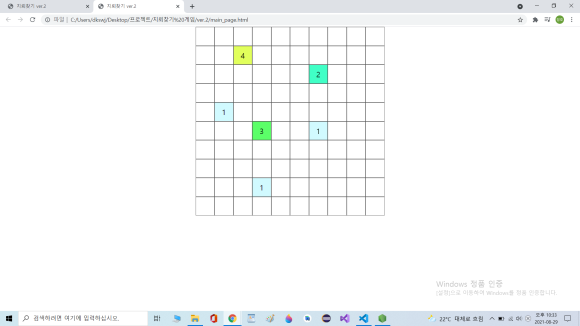
main.html
<!DOCTYPE html>
<html lang="en">
<head>
    <meta charset="UTF-8">
    <title>지뢰찾기 ver.2</title>
    <link rel="stylesheet" href="CSS.css">
    <script src="ReturnMineMap.js"></script>
    <script>
        window.onload = function(){
            var cellAmount = 10;

            var map = returnMineMap(cellAmount);

            var cells = new Object();

            for(var i=0;i<cellAmount;i++){
                cells[i] = new Object();
                for(var j=0;j<cellAmount;j++){
                    cells[i][j] = document.createElement("div");
                    var tempCell = cells[i][j];
                    tempCell.className = "notClick";
                    tempCell.map = map[i][j];
                    tempCell.addEventListener("click",cellClick,false);
                    document.body.appendChild(tempCell);

                }
            }
            function endGame(){
                for(var i=0;i<=cellAmount;i++){
                    for(var j=0;j<cellAmount;j++){
                        cells[i][j].innerHTML = cells[i][j].map;
                        cells[i][j].removeEventListener("click",cellClick,false);
                        cells[i][j].style.backgroundColor = mapColor(cells[i][j].map);
                    }
                }
            }
            function cellClick(){
                this.innerHTML=this.map;
                this.style.backgroundColor = mapColor(this.map);
                if(this.map=="m"){
                    endGame();
                    console.log("game end....!");
                    console.log(this.map=="m");
                }
            }

            function mapColor(map){
                var color;
                console.log("mapColor Activated...!   map : "+map);
                if(map==0)
                        color="rgb(146, 146, 146)";
                if(map==1)
                        color="rgb(209, 250,255)";
                if(map==2)
                        color="rgb(64, 255, 198)";
                if(map==3)
                        color="rgb(91, 255, 104)";
                if(map==4)
                        color="rgb(225, 255, 91)";
                if(map==5)
                        color="rgb(255, 211, 91)";
                if(map==6)
                        color="rgb(250, 91, 255)";
                if(map==7)
                        color="rgb(255, 91, 154)";
                if(map==8)
                        color="rgb(65, 31, 255)";
                if(map=="m")
                        color="rgb(255, 51, 51)";

                    console.log(color);
                    return color;

            }
        }
    </script>
</head>
<body>

</body>
</html>
ReturnMineMap.js
/*
1. 2차원 배열 NxN 생성
2. 랜덤하게 지뢰배치
3. 근처 지뢰수 파악
*/
function returnMineMap(n){
    var obj = new Object();

    makeMap(n);
    for(var i = 0;i<n;i++){
        for(var j=0;j<n;j++){
            detectAround(i,j);
        }
    }

    for(var i=0;i<n;i++){
        for(var j=0;j<n;j++){
            console.log(obj[i][j]);
        }
        console.log("nextLine");
    }

    return obj;
    // 2차원 배열 nxn 생성, 랜덤하게 지뢰배치
    function makeMap(n){
        for(var i = 0; i<n;i++){
            obj[i] = new Object();
            for(var j=0;j<n;j++){
                if(Math.random()>0.7){
                     obj[i][j] = 'm';
                     console.log("generate Mine. point : "+i+" , "+j);
                }
                else obj[i][j] = 0;
            }
        }
    }

    //근처 지뢰수 파악
    function detectAround(a,b){
        if(obj[a][b]!='m'){
            var countMine = 0;
            for(var i=a-1;i<=a+1;i++){
                for(var j=b-1;j<=b+1;j++){
                    if(i<0 || j<0 || i>=n || j>=n)continue;
                    if(obj[i][j]=='m')countMine++;
                }
            }
            obj[a][b] = countMine;
         }
    }
}
CSS.css
*{
    margin:0;
    padding:0;
}
body{
    margin:0px auto;
    width:500px;
    height:500px;
}

.notClick{
    float:left;
    margin:0;
    border: solid 1px rgb(83, 83, 83);
    width:48px;
    height:48px;
    line-height: 50px;
    font-size:20px;
    text-align: center;
    background-color: white;
}
반응형
'web > 코딩' 카테고리의 다른 글
| 웹 html,css,javascript 예제 - 타이머 (0) | 2022.01.08 |
|---|---|
| 웹 (html,css,javascript) 예제 - 반응속도 테스트 (0) | 2022.01.08 |
| 웹 (html,css,javascript) 예제 - 무작위로 바뀌는 배경색 (0) | 2022.01.08 |
| 웹 (html,css,javascript) 예제 - 오셀로 게임 (0) | 2022.01.08 |